Your POS and your CCI system, working together.
Load and take FasCard and LaundryCard cards at the counter. Link wash & fold orders to FasCard WDF ProLink, start machines from the order, and see what every order costs to wash.
Load and take laundry cards at the counter.
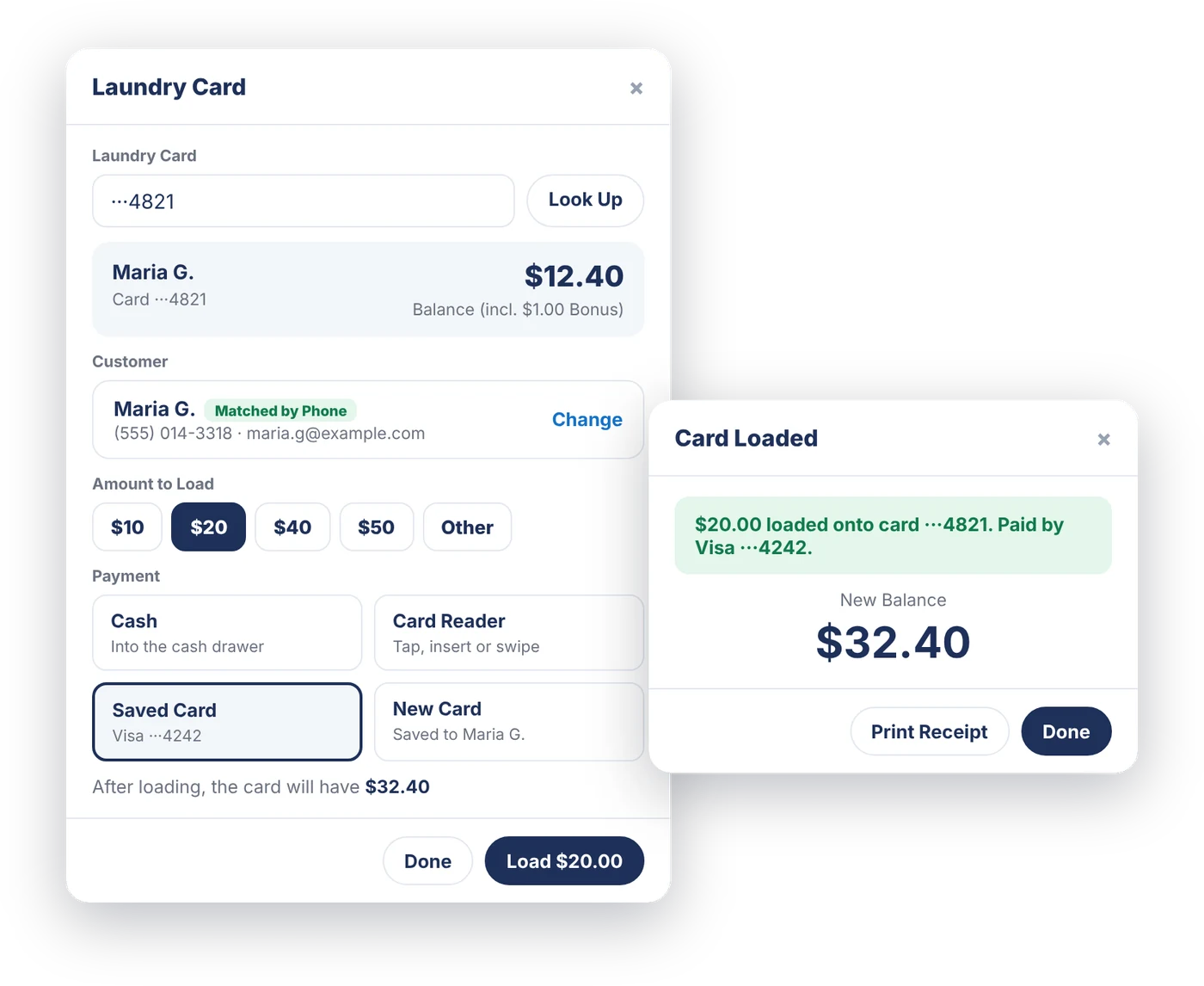
Look up a FasCard or LaundryCard card, see the balance, and load $10, $20, $40, $50, or any amount from $1 to $500. The customer pays with cash, the card reader, a saved card, or a new card, and the card is loaded only after the payment is saved.
- Find the customer by phone or email
- Pay with the laundry card at the cart, on the order screen, or on your phone
- Balance checked before every charge
- Loads show in Payments and the Cash Drawer, kept separate from Sales
Every wash & fold order, linked to its machines.
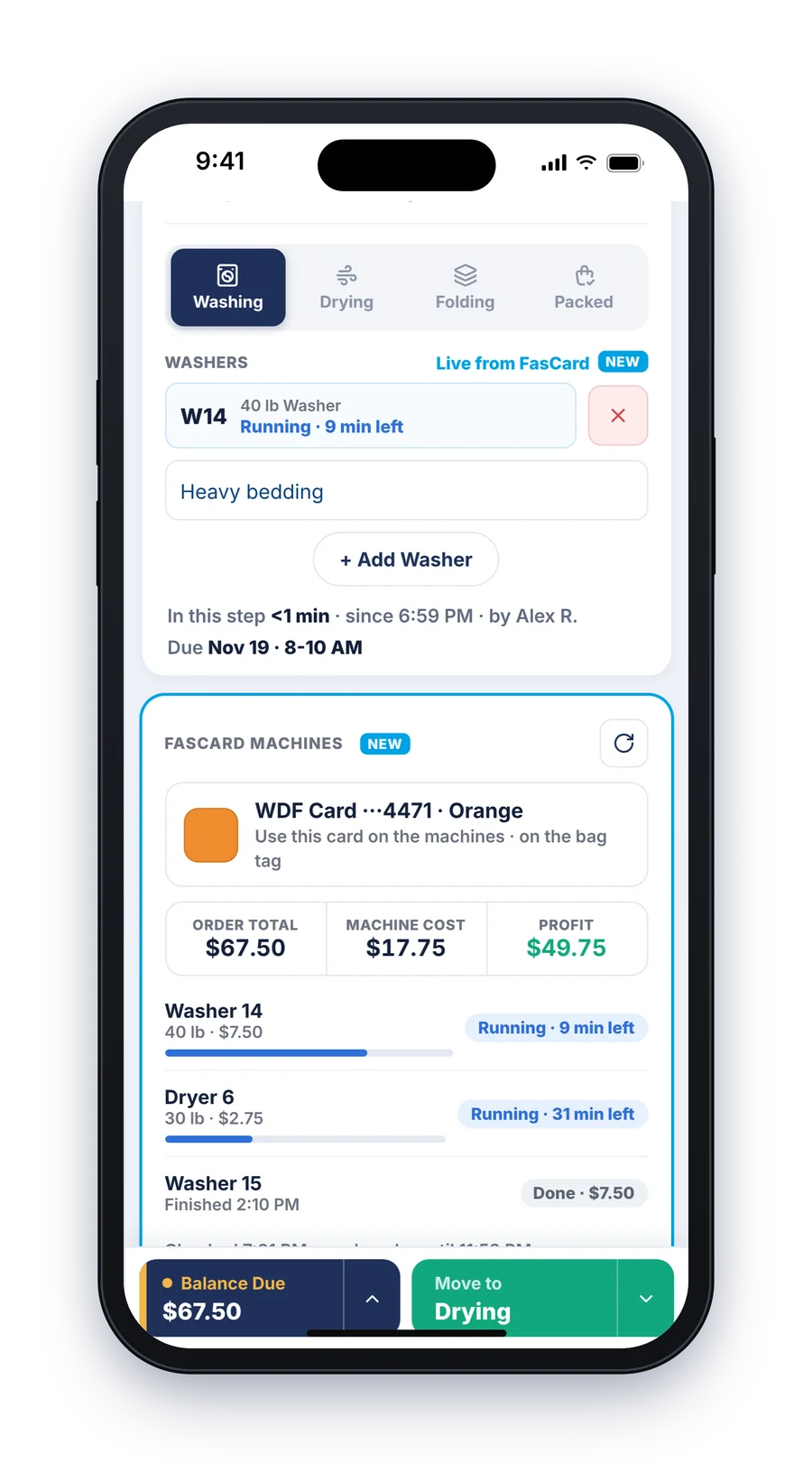
For FasCard stores, LaunderPay links a WDF card to the order when it goes In Progress, or tap Link to FasCard Now at Collected. Each wash and dry on that card shows on the order with its live status and cost.
- Links on its own at In Progress
- Live status on each machine, like "Running · 9 min left"
- Machine cost and profit right on the order
- Closes on its own at Ready, Out for Delivery, Completed, or Cancelled
The right card for the right bag.
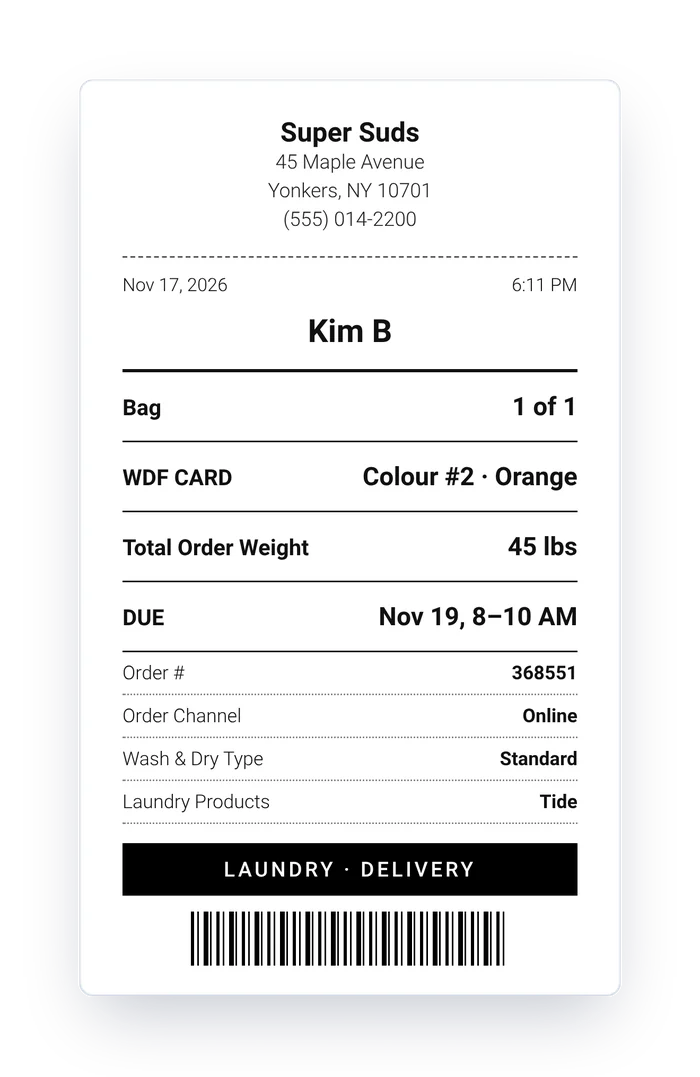
The WDF card colour shows on the order screen and prints on the bag tag, so whoever is at the machines grabs the right card for every load. No guessing, no mixed-up orders.
- Colour card on screen and on the bag tag
- Works with the bag tags you already print
- One card per order
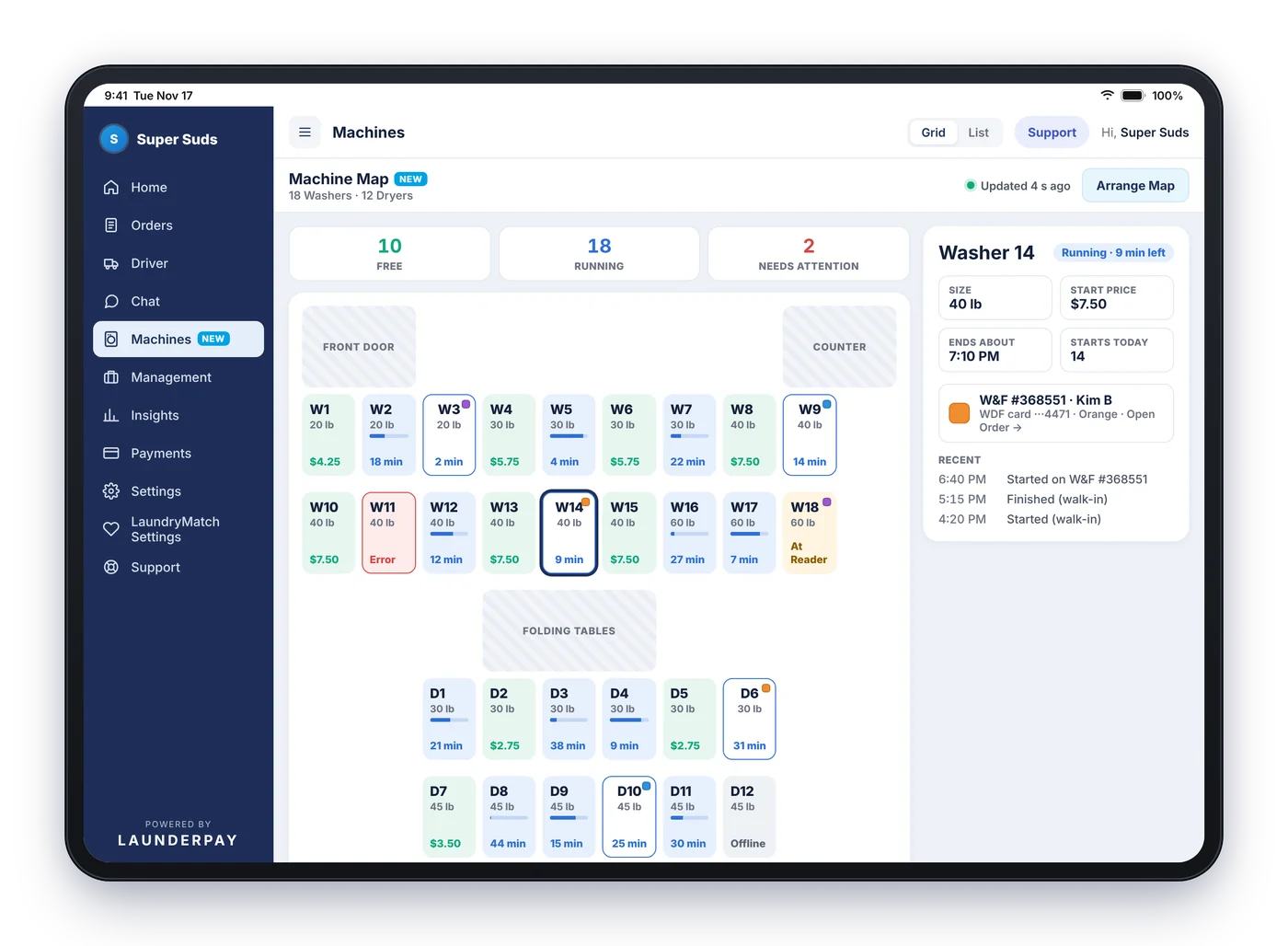
See every machine. Start one from the screen.
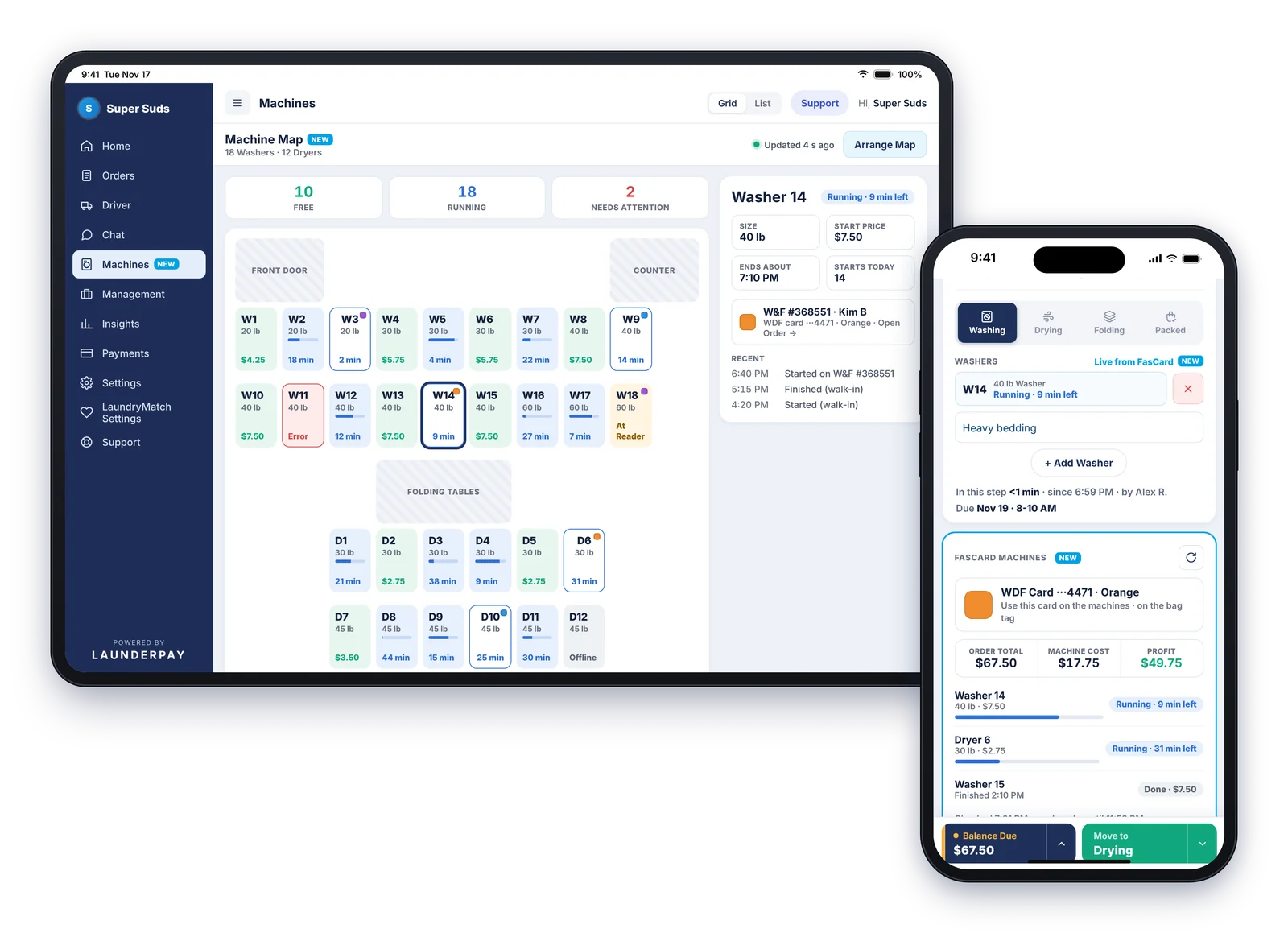
The Machine Map shows each washer and dryer as Free, Running, or Needs Attention, laid out like your store. Tap Start a Machine on an order or on the map, then press Start at the machine's reader.
- Updated every 30 seconds
- Arrange Map to match your floor, with labels like Front Door and Counter
- Tap a machine for its details
- A double tap can't start a machine twice
- Works on phones too
Know what every order really costs.
Add your machines once in Settings > Machines, with names, sizes, and prices. Dryers can be priced per use or per minute. LaunderPay adds up machine cost on each order and shows your profit.
- Cost Report for Today, 7 Days, 30 Days, This Month, or any dates
- Orders, Sales, Machine Cost, Profit, Profit %, and Cost per lb
- By day, by machine, or by order, with CSV download
- Works for every store, with or without CCI
Which features do I get?
It depends on your CCI system. Machine cost works for every LaunderPay store.
| Feature | Every store | CCI storesFasCard or LaundryCard | FasCard stores |
|---|---|---|---|
| Machine Cost & ProfitCost Report by day, machine or order | ✓ | ✓ | ✓ |
| Laundry Card Balance & Load | — | ✓ | ✓ |
| Pay with Laundry CardCart, order screen and phone | — | ✓ | ✓ |
| WDF ProLinkColour card on screen and bag tag | — | — | ✓ |
| Start a MachineThen press Start at the reader | — | — | ✓ |
| Machine MapFree, Running, Needs Attention | — | — | ✓ |
Swipe to see all columns.
Set up in three steps.
We help you through it when you switch.
Questions owners ask.
Which CCI systems does LaunderPay work with?
FasCard and LaundryCard. Laundry card Balance & Load and Pay with Laundry Card work with both. WDF ProLink, Start a Machine and the Machine Map are for FasCard stores.
Can LaunderPay start my washers and dryers?
Yes, for FasCard stores. Tap Start a Machine on the order or on the Machine Map, then press Start at the machine's reader. A double tap can't start a machine twice.
Do laundry card loads count as sales?
No. Loads show in Payments history and the Cash Drawer as "Laundry Card Load", and they are kept out of your Sales numbers.
What if a card doesn't have enough on it?
LaunderPay checks the balance before it charges. If it's short, staff see how much is on the card and how much the sale is, so they can take the rest another way.
What happens if a laundry card charge doesn't go through?
If the sale isn't saved, the money is put back on the card. Card loads work the same way in reverse: the card is only loaded after the payment is saved.
How up to date is the Machine Map?
It refreshes every 30 seconds and shows each machine as Free, Running or Needs Attention.
Where do machine prices come from?
For FasCard stores, machine prices on linked orders come from FasCard. Every store can also add its machines and prices in Settings > Machines. The price is locked when a machine is picked, so a later price change doesn't change past orders.
Do I need my own CCI login?
Yes. Each store connects with its own CCI login, and the password is stored encrypted.
Is the CCI integration included?
Yes. It comes with LaunderPay at $70 a month per store, with every POS feature included. Your CCI account stays with CCI.
Laundry runs better here.
See LaunderPay with your own CCI setup, prices, and services in a free demo.
Book a Free Demo